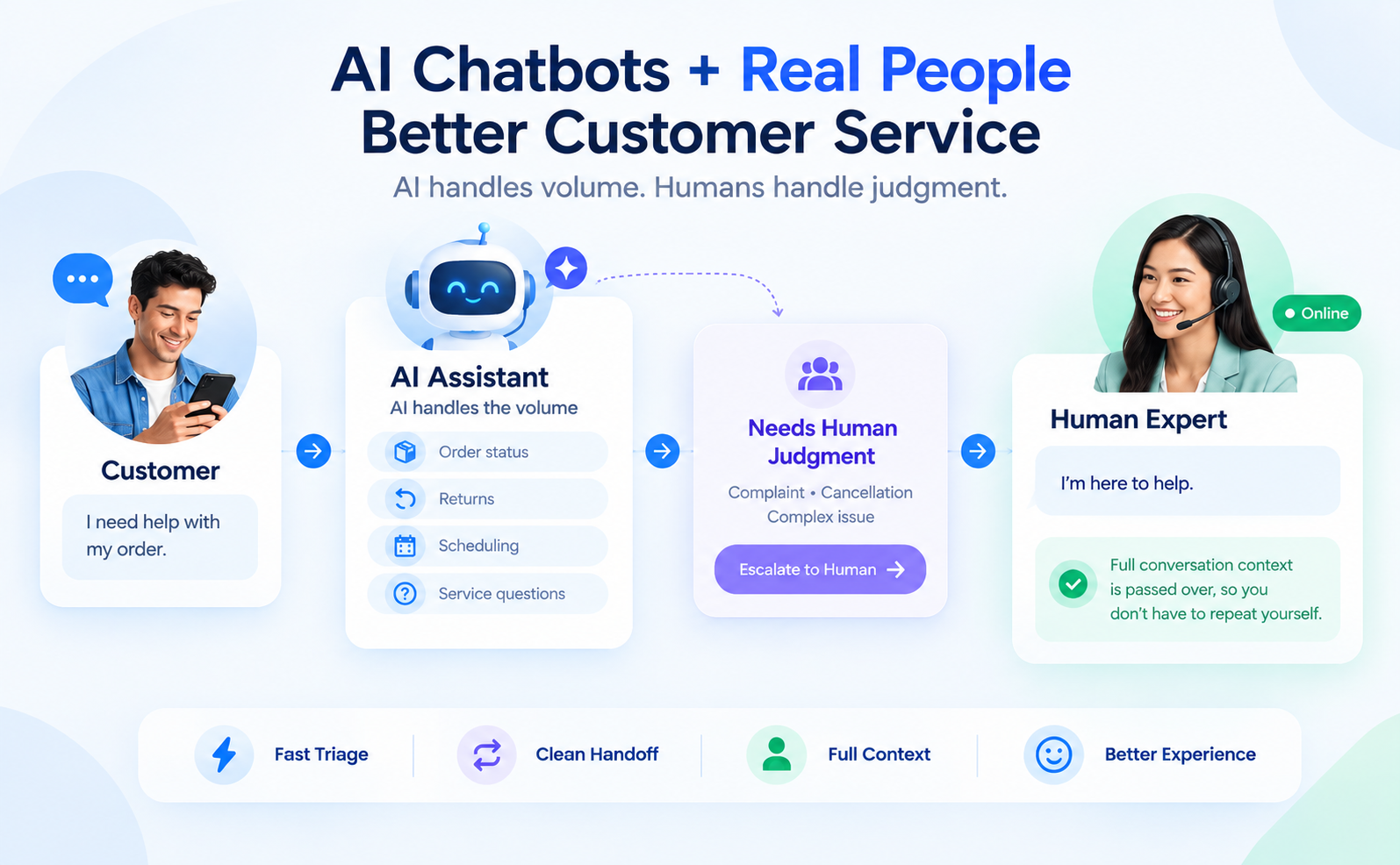
Most small businesses set up an AI chatbot backwards. They install a tool, turn it on, and point it at every incoming message, then wonder why customers start complaining that the business "feels less personal" than it used to, sometimes within days of launch. A proper AI chatbot customer service setup isn't about automating conversations. It's about deciding, deliberately, which conversations deserve automation and which ones still need a person, and building the handoff between the two so cleanly that most customers never notice the seam.
The data backs up why this matters more than the sales pitch for any given chatbot tool suggests. Hybrid setups, AI handling triage with a clean human escalation path, produce the highest customer satisfaction scores of any configuration, outperforming both pure AI and pure human support running on their own. Get the handoff wrong, though, and you're not saving time. You're training customers to distrust your brand.
Chatbot adoption has moved past the experimental phase. Roughly 80% of companies are now using or actively planning AI-powered customer service, up from just 5% of customer service teams using AI-powered chatbots in 2020. That's one of the fastest adoption curves in enterprise technology, and small businesses are no longer choosing whether to compete with that shift. They're choosing how to implement it without the downside that's made "chatbot" a mildly dirty word for a lot of consumers.
That downside is real, and it's worth naming directly instead of glossing over it. A widely discussed April 2026 Forbes piece put it bluntly: customers increasingly dislike AI chatbots, and the backlash is concentrated exactly where automation replaces judgment a human would have applied instinctively, de-escalating a frustrated customer through tone, not just information. A bot can detect sentiment. It generally can't repair a relationship the way a person on the other end of a chat can, and pretending otherwise is how a cost-saving tool quietly becomes a retention problem.
Key insight: the business case for AI customer service isn't "replace humans." It's "let AI handle volume so humans can handle judgment." Businesses that blur that line lose customers even while their support metrics look better on paper.
The numbers make the tradeoff concrete rather than theoretical.
The pattern across all of this is consistent: AI's real advantage is triage speed and cost, not conversational nuance. Design your setup around that strength instead of asking the bot to do the one thing it's still worst at.
This is the sequence we walk small business clients through when they're deploying their first AI chatbot for customer service. Skipping steps here is exactly how businesses end up with the "customers hate the bot" outcome instead of the hybrid CSAT win described above.
| Step | What to Do | Why It Matters |
|---|---|---|
| 1 | Audit 90 days of past support conversations and tag by type | Reveals which conversations are genuinely repetitive (automate) versus emotionally charged or ambiguous (keep human) |
| 2 | Start the bot on the narrowest useful scope, not your full FAQ | A bot doing three things well builds trust faster than one attempting everything and failing on edge cases |
| 3 | Write explicit escalation triggers before launch | Frustration language, repeated questions, and refund or complaint requests should route to a human automatically, not after a customer demands it |
| 4 | Pass full conversation context on every handoff | Nothing damages trust faster than a customer having to repeat themselves to a human after already explaining the issue to the bot |
| 5 | Disclose that it's a bot, clearly, from the first message | Customers who feel deceived about talking to a bot are far more likely to disengage than customers who simply know upfront |
| 6 | Track CSAT and escalation accuracy weekly, not just deflection rate | Deflection alone is a misleading success metric; a conversation that avoided a human but left the customer unresolved isn't a win |
Notice that "add more automation" isn't step one. It's the outcome of a working system, applied gradually once the narrower scope is proven, not the starting assumption.
Most of the complaints businesses get about their chatbot don't trace back to the AI's language capability. They trace back to a handful of experience decisions that have nothing to do with how sophisticated the underlying model is. Getting chatbot customer experience right is less about picking a smarter AI and more about respecting a few unglamorous details customers notice immediately.
Response speed matters more than most businesses assume. High-performing bots resolve straightforward cases in under 60 seconds, and industry data shows chatbots can cut first-response time by as much as 90% compared to a queued human inbox. That speed alone accounts for a meaningful share of the satisfaction lift businesses see after deployment, independent of how "smart" the bot's answers are.
Tone consistency is the other underrated factor. A bot that answers in stiff, obviously scripted language reads as impersonal even when the answer itself is correct and fast. Matching the bot's voice to how your actual team talks to customers, not a generic corporate register, closes a surprising amount of the gap between "helpful tool" and "annoying obstacle" in how customers describe the experience. This is a content and brand voice exercise as much as a technical one, and it's frequently skipped because it falls between the marketing team and whoever configured the software.
Finally, honesty about limitations builds more trust than pretending the bot can do everything. A chatbot that says "I can help with order status and returns, but I'll connect you with our team for anything else" sets an expectation the bot can actually meet. A bot that tries to handle everything and fails on the edge cases erodes confidence in the parts it's genuinely good at.
Tool selection matters less than most vendor pitches suggest, but a few practical distinctions genuinely affect outcomes for a small team without a dedicated CX department to manage the rollout. We cover platform-specific setup in more depth in our roundup of AI tools worth using for small business marketing, but the customer-service-specific version comes down to three categories.
AI inbox platforms like Intercom, Zendesk AI, and Freshdesk Freddy layer automation on top of an existing support inbox, which suits businesses that already have a ticketing system and want AI to triage within it rather than replace it. Standalone chatbot builders like Tidio and Crisp suit businesses starting from scratch, typically with lower upfront cost and faster setup. Workflow automation platforms connecting AI reasoning to your existing tools fit teams needing the bot to actually take action, like updating an order or checking inventory, not just answer questions.
Across all three categories, the AI customer service tools worth evaluating share a few non-negotiable features for a small team: context-passing on handoff, configurable escalation triggers, and reporting that goes beyond deflection rate to show CSAT and resolution quality. A tool that can't hand a human agent the full conversation history on escalation will force customers to repeat themselves, which undoes most of the trust the bot built in the first place. Price and setup speed matter, but a cheap tool missing these three features usually costs more in customer goodwill than it saves in software fees.
For most small businesses evaluating an AI chatbot for small business setup for the first time, starting with an inbox-layer tool rather than a standalone builder tends to produce a cleaner escalation path, since the human team is already working inside the same system the bot is triaging into.
The failure pattern is easy to spot because it's so common: a chatbot launched to handle every inbound message on day one, with no defined escalation triggers and no disclosure that customers are talking to AI. Within weeks, review sentiment starts naming the bot directly, "robotic," "unhelpful," "wouldn't let me talk to a person," which is a very different kind of complaint than a slow response time, because it's a trust complaint, not a speed complaint.
The fix rarely starts with better AI. It starts with a 90-day ticket audit that almost always reveals a smaller, more repetitive slice of inbound volume than the business assumed, scheduling questions, service-area questions, simple status checks, the exact low-emotion, high-repetition category AI actually handles well. Scoping the bot down to that slice, adding explicit escalation triggers for complaint language and repeated unanswered questions, and putting a simple disclosure line at the start of every chat typically resolves the complaint pattern within a single reporting cycle, without any change to the underlying AI model. The fix was never the model's intelligence. It was what the business had allowed the model to touch, and how honestly it handed off when it reached the edge of its scope.
Export your last 90 days of support conversations and tag each one by type. Pick the three most repetitive, low-emotion categories (order status, hours, and service-area questions are common ones) and scope the bot to those alone.
Next, write the escalation triggers down: refund or complaint language, the same question asked twice, and any request for a person all route to your team with the full conversation attached. Then add one opening line that says the customer is talking to an AI assistant and can ask for a person at any time. Review CSAT and the escalation log every week for the first month, and only widen the bot's scope after that narrow version holds up.
Ready to build an AI chatbot customer service setup that actually protects your reputation? Schedule an AI chatbot strategy consultation and we'll map out what to automate, what to keep human, and how to make the handoff invisible to your customers.